
AI levels and hidden columns
Each connection decides what AI may do there, and which columns AI never sees.
The four levels
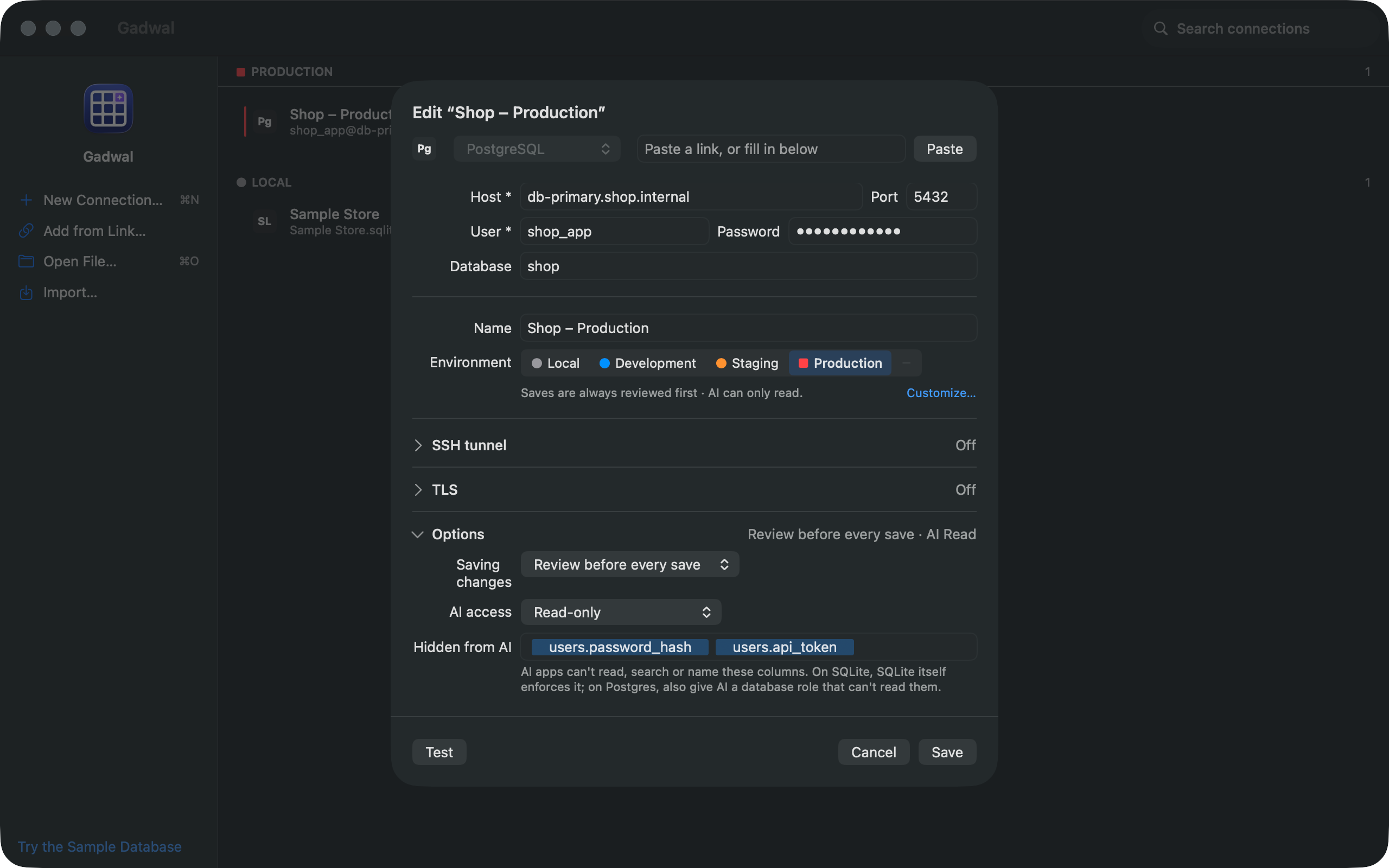
Set it under AI access when you create or edit a connection. The AI & MCP page lists every connection under Per-Connection AI Access; click one to change it.
| Level | Reads | Writes and schema changes | Destructive |
|---|---|---|---|
| Off | The connection isn’t visible to AI at all. It doesn’t appear in list_connections. | ||
| Read-only | Run | Refused, with an explanation | Refused |
| Ask before write | Run | Staged for your approval | Staged, backup first |
| Full | Run | Run at once and logged | Staged, backup first |
A statement Gadwal can’t classify is treated as a write, and waits for you even on Full.
Destructive means DROP, TRUNCATE, DELETE or UPDATE without a WHERE, ALTER statements that drop, rename or retype, and similar. On BigQuery, any AI query that would scan more than the connection’s cost limit is treated as destructive too.
Starting levels
New connections start at the level their environment suggests:
- Production: Read-only. Raising a Production connection to Ask before write or Full asks you to confirm, and the AI pill is outlined in red while it’s above Read-only.
- Local, Development, Staging and unlabelled: Ask before write.
Lowering a level never asks.
How Read-only is enforced
Reads run in a read-only transaction or session on the database, so even a query with side effects can’t write. Two engines have no such session, and Gadwal’s statement classifier is the guard there:
- Cloudflare D1 (remote): there’s no read-only session.
- BigQuery: every AI query is checked and dry-run first, so you see the bytes it would scan.
For the strongest setup on Postgres or MySQL, also connect with a database user that can only read.
Hidden columns
Columns hidden from AI are removed before results leave Gadwal. AI apps can’t read, search or name them:
- they’re dropped from query results, samples and value searches;
describe_tableleaves them out andget_ddlmasks their names as«hidden»;- SQL that mentions one is refused, and so are inserts or updates that set one.
Hidden by default: any column whose name contains password, passwd, secret, token, api_key, apikey, ssn, card, cvv or hash. You can show one of those again.
Hide more: edit the connection, find Hidden from AI, and add table.column, or click Load Columns to pick from the list (it connects to the database to read the column names). The field is shown when the AI level isn’t Off.
On SQLite, SQLite itself enforces it. On Postgres, also give the AI a database role that can’t read those columns.
Limits on what comes back
Every answer to the AI is capped: 200 rows by default (Rows returned to AI on the AI & MCP page: 10 to 5,000), 2 KB per cell and 256 KB per answer.